

The bottom line: Using active promo codes like WISESAVE or TRISTANSEO secures an immediate 10% discount on professional AI writing. Pairing these coupons with annual billing maximizes budget efficiency, slashing costs by up to 74% compared to monthly plans. Crucially, all purchased credits feature lifetime validity and never expire, providing unmatched flexibility for creators. save 10% on Wisewand.
Are you tired of overpaying for premium AI content when a simple wisewand discount code could slash your production costs instantly? This walkthrough reveals exactly how to apply active vouchers like WISEDEAL or TRISTANSEO at the secure checkout screen to secure an immediate 10% price cut on your next credit pack or subscription plan. By mastering these specific billing secrets, you will unlock the maximum value of non-expiring credits and discover why savvy creators prioritize annual billing to protect their margins from future price hikes while scaling their publishing output with total financial confidence.
- Active Wisewand Discount Codes For 2026 Savings
- Steps To Apply Your Wisewand Coupon At Checkout
- Which Wisewand Pricing Plan Offers The Best Value?
- Maximizing Your New Account For Content Production
Active Wisewand Discount Codes For 2026 Savings
Save money on AI now. Use these specific deals to cut your production costs immediately.
Current Promo Codes Like WISESAVE And TRISTANSEO
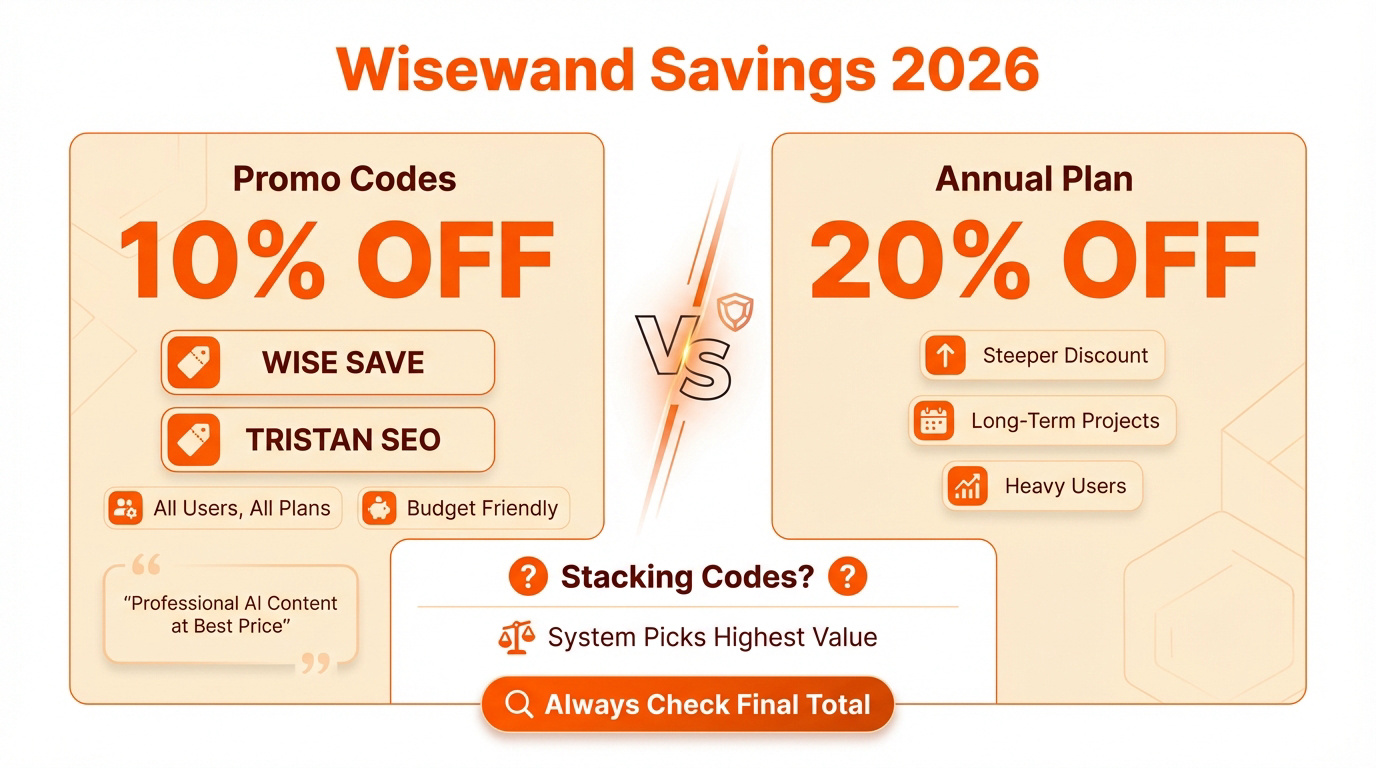
Use WISESAVE or TRISTANSEO for 10% off. These verified vouchers slash your bill instantly on professional writing.
These work for all users. High-volume creators save most by entering these codes at the checkout screen.
- Code: WISESAVE – 10% off
- Code: TRISTANSEO – 10% off
- Applicability: All plans
Using a verified promo code like TRISTANSEO ensures you get the best possible entry price for professional AI content generation.
Choosing Between Promo Codes And Annual Plan Savings
Annual billing gives 20% off. It beats the 10% coupon for long-term work and larger projects.
Calculate your credit needs first. This prevents overpaying for unused features or unnecessary monthly overhead.
The system applies the best discount value automatically. Check your total before you finish the payment.
| Option | Discount | Best For | Savings |
|---|---|---|---|
| Promo Code | 10% | Short-term use | 10% total |
| Annual Billing | 20% | Long-term projects | 20% total |
| Combined | Up to 74% | Agency plans | Maximum value |
Steps To Apply Your Wisewand Coupon At Checkout
Now that you have the right code, let’s make sure it actually works when you reach the payment screen. Don’t leave money on the table.
Locating The Promotion Field In The Billing Flow
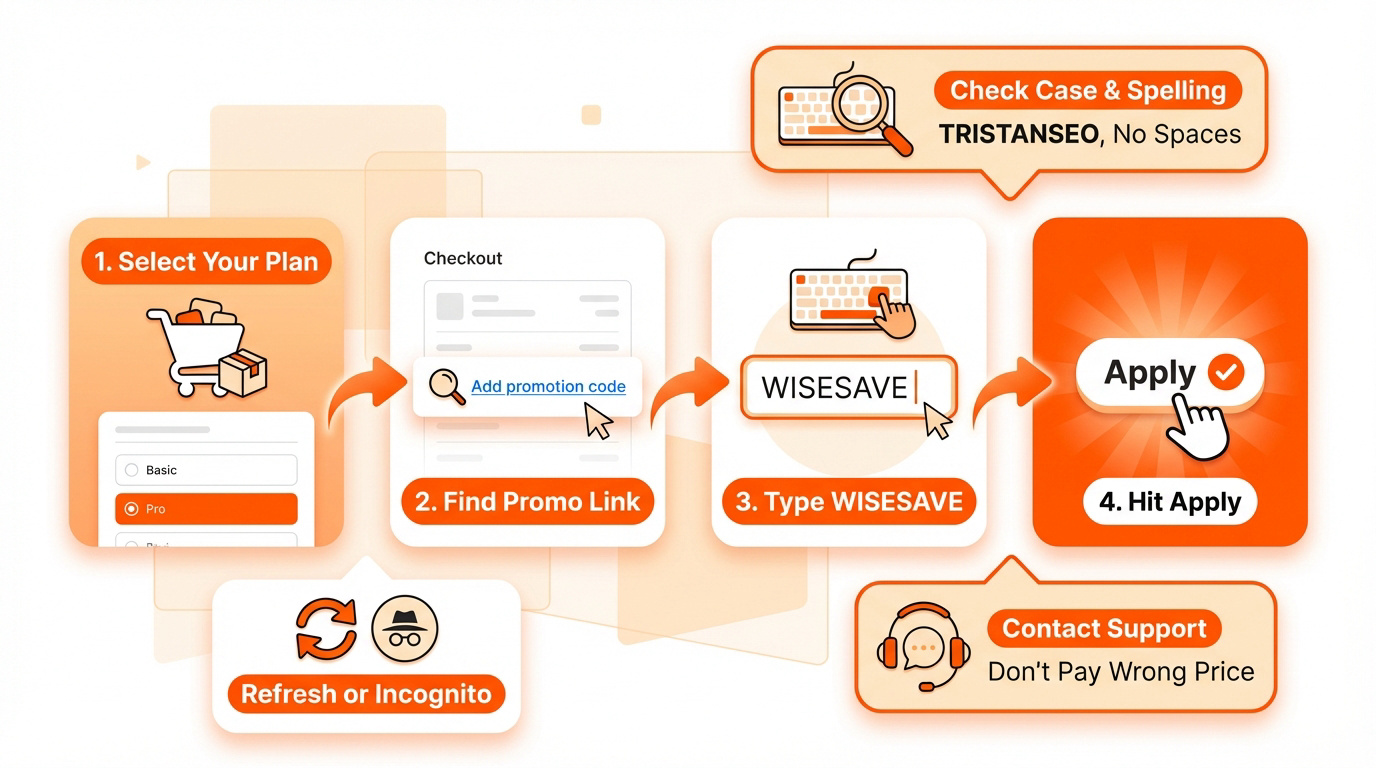
Start at the pricing page and select your preferred pack. Move to the secure Stripe checkout. Look for the “Add promotion code” link on the left side.
The link is often small and blue. It sits right above the total amount. Do not miss it before paying for your credits.
Follow these quick steps to lock in your savings immediately. The price should drop once you hit the button.
- Select your plan
- Click ‘Add promotion code’ on the left
- Type WISESAVE
- Hit Apply
Check the final total before clicking pay.
Fixing Common Activation Issues And Spelling Errors
Codes are case-sensitive sometimes. Make sure there are no extra spaces at the end. Double-check the spelling of TRISTANSEO carefully to avoid annoying errors.
If the field does not appear, refresh the page. Sometimes browser extensions block the coupon box. Try using an incognito window instead for a clean session.
Contact support if the discount doesn’t show up. They are usually very responsive to help you out. Never complete the purchase if the price is wrong.
Which Wisewand Pricing Plan Offers The Best Value?
Saving money with a code is great, but picking the wrong plan can still waste your budget.
Pay-As-You-Go Credits Versus Monthly Subscriptions
Testing the waters with pay-as-you-go makes total sense. Only pay for actual output. It is the safest bet for anyone using a wisewand discount code.
Heavy hitters should definitely look at monthly subscriptions for better rates. Tiers scale from Starter up to Max. Just match your choice to your weekly publishing volume. It keeps your monthly overheads predictable and manageable while saving cash.
Subscriptions guarantee a constant credit supply for busy agencies. You won’t hit a wall mid-project when those client deadlines are screaming at you.
The Benefit Of Credits That Never Expire
Most AI platforms wipe your balance every single month without fail. Wisewand refuses to play that game. Your bought credits sit in your account until you actually use them.
Occasional writers get a huge win with this specific flexibility. Grab a big bulk pack today. Burn through it over the next twelve months at your own pace.
Forget that annoying “use it or lose it” anxiety forever. You can finally prioritize high-quality output without rushing through your credits. That is where the real value hides for your wallet and strategy.
Maximizing Your New Account For Content Production
Once your discounted credits are active, it’s time to set up your workspace for maximum efficiency.
Configuring Personas And Projects For Specialized Modes
Build unique personas for every niche you target. Activate the Affiliate mode to craft deep product reviews. Toggle the E-commerce setting for punchy, high-conversion product descriptions.
Sort your daily tasks into distinct, dedicated projects. This keeps your main dashboard clutter-free and sharp. Such organization is vital when juggling several high-stakes client websites at the same time.
Linking a persona to a specific project cuts down setup time significantly. The engine quickly masters the exact brand voice you need. So, you spend far less effort fixing drafts later—it just works.
Scaling Output With WordPress And API Integration
Hook your WordPress site straight into the central dashboard. This setup enables instant, one-click publishing for all your pending drafts. It kills the soul-crushing copy-paste routine forever. This is exactly how smart creators scale their output—no more manual labor.
Power users really ought to dig into the available API hooks. Connect your workflow to external automation tools. This transformation turns your basic setup into a massive content factory.
Grab these pro features now and save 10% on Wisewand. Just apply the code WISESAVE at checkout today.
Maximize your ROI by applying a 10% wisewand discount code at checkout and pairing it with annual billing for peak savings. Since your credits never expire, securing these rates today guarantees long-term growth at minimal cost. Enter your code now to build a high-efficiency content factory that lasts forever.
FAQ
How do I successfully apply a Wisewand discount code to my purchase?
To use your discount, first head to the Wisewand pricing page and select your preferred credit pack or subscription. Once you reach the secure checkout screen, look for the “Add promotion code” link located just above the final total. Simply type in a verified code like WISESAVE or TRISTANSEO and click apply to see your 10% savings reflected immediately.
Where exactly is the promotion field located during the Wisewand checkout process?
The promotion field is found on the secure Stripe payment page. It often appears as a small, blue text link labeled “Add promotion code” situated on the left side of the screen, right above the order total. Make sure to click this link to reveal the input box before completing your transaction, as you cannot apply the code after the payment is processed.
Do Wisewand credits expire if I don’t use them within a month?
One of the biggest advantages of Wisewand is that your credits never expire. Whether you purchase a pay-as-you-go pack or have remaining credits from a monthly subscription, they stay in your account permanently. This allows you to buy in bulk during a sale and use them at your own pace without the pressure of a “use it or lose it” policy.
Can I stack a promo code with the existing annual plan discount?
Generally, the checkout system is designed to apply the single highest value discount available. While annual plans already offer a massive structural saving of up to 74% per credit compared to monthly rates, some specific codes like REVIEWS10 have been known to stack with certain launch offers. Always check the final total before clicking pay to ensure you are getting the best possible price.
What should I do if my Wisewand coupon code isn’t working?
If your code isn’t activating, first check for spelling errors and case sensitivity; codes like WISEDEAL should be entered exactly as shown. Ensure there are no accidental spaces at the beginning or end of the text. If the field still doesn’t appear or work, try refreshing the page or using an incognito browser window, as some extensions can interfere with the checkout display.
Which Wisewand plan offers the best overall value for high-volume creators?
For those producing content at scale, the Annual Max plan provides the lowest cost per credit, often dropping the price significantly compared to the Starter or Pay-as-you-go options. If you aren’t ready for a yearly commitment, the larger pay-as-you-go packs (like the 2400 credit bundle) combined with a 10% discount code offer excellent flexibility while still keeping your production costs manageable.